StackSwatch

Embed an Interactive 2D Configurator on Any Website

No matter what platform powers your site, StackSwatch fits right in. If your builder has an embed or HTML block, you can launch a visual 2D layer stacker in minutes. Let customers personalize finishes in real time, generate instant price estimates, and submit spec-ready inquiries—no 3D software or custom programming required.

Works with Framer, Webflow, GoDaddy, and custom HTML.

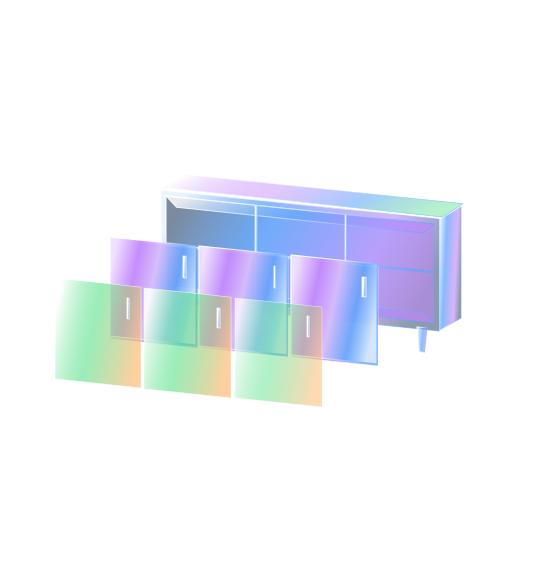
Layer your 2D visuals

Embed on your website

Capture leads

Visual product customization without 3D complexity.

Most interactive configurators require complex 3D modeling files, WebGL engines, or dedicated developer maintenance. StackSwatch replaces that overhead with an intuitive 2D layer stacker.

  • Fast 2D Layer Stacking: Upload transparent PNG or WEBP images for your materials, colors, and components. Choices stack cleanly on screen to render a live, high-resolution product preview.

  • Tactile Material Swatches: Swap rigid text drop-down menus for clickable visual textures and color swatches.

  • Built for High-Ticket Lead Generation: Skip standard cart checkouts. Visitors configure their ideal build and submit an inquiry with every option and specification attached.

  • Dynamic Real-Time Quoting: Assign a base price and per-option add-ons for automatic quotes, or hide pricing behind a contact form to capture prospects first.

  • Branded PDF Spec Sheets: Allow prospects, designers, and project managers to download a branded PDF summary containing their selections, pricing, and your contact details.

If you can paste a snippet, it works.

Webflow & Framer: Drop clean visual customization into high-end, designer-led sites with standard embed components.

GoDaddy Website Builder: Add interactive visuals to straightforward small-business layouts using the HTML section.

Squarespace, Wix & WordPress: Full native compatibility with block editors, Elementor, Divi, and standard widgets.

Showit & Weebly: Drop an embed frame into drag-and-drop canvases in seconds.

Custom Code & Headless Stacks: Works cleanly inside static HTML files, React, Next.js, Vue, or any custom CMS template.


Ready to embed in 3 simple steps

Step 1: Build Your Configurator in StackSwatch

  • Create your option categories (such as finishes, cladding, materials, or hardware).
  • Upload your base product image along with aligned transparent PNG or WEBP layers for each customizable variation.
  • Add swatch images, set your pricing rules (optional), and customize your buttons, borders, and fonts to match your site's style.

Step 2: Copy Your Embed Code

  • Navigate to the Embed & share tab inside StackSwatch.
  • Copy your lightweight, auto-generated HTML snippet to your clipboard.

Step 3: Paste into Your Website Editor

  • In your website editor (Framer, Webflow, GoDaddy, or custom code), locate the page section where you want the visualizer to appear.
  • Add an Embed, Code, or Custom HTML block.
  • Paste your snippet and publish. Your configurator will automatically adapt to your page’s width.

FAQ

StackSwatch works on virtually any platform that allows you to add custom HTML or embed code. If your website builder includes a block labeled "Embed", "Custom Code", "HTML", or "Widget", StackSwatch will work properly.

Your product has options.
Let customers see them.

Build your first 2D configurator today—no coding or 3D modeling required.

Get Started