



StackSwatch

The Visual 2D Product Configurator for High-Ticket Shopify Stores

Custom builds, bespoke furniture, and modular structures don’t belong in a standard checkout cart. StackSwatch replaces rigid variant drop-downs with an interactive 2D visual builder. Let your buyers configure finishes in real time, calculate instant quotes, and submit spec-ready inquiries directly to your sales team—all on your Shopify store.

Not affiliated with Shopify in any way.

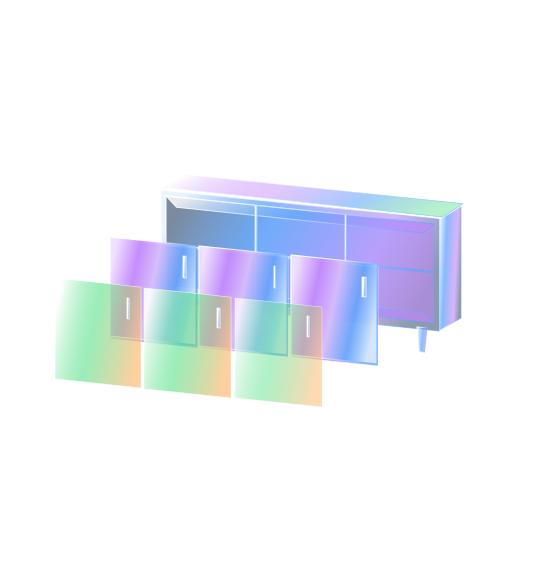
Layer your 2D visuals

Embed on your website

Capture leads

Built specifically for custom manufacturing, not commodity retail.

Standard Shopify product pages assume customers want to add a single SKU to a shopping cart and pay immediately. For custom fabricators, garden room builders, and bespoke manufacturers, this model breaks down. StackSwatch solves the core bottlenecks high-ticket merchants face on Shopify:

  • Bypass Shopify’s 100-Variant Limit: Shopify natively caps products at 100 variant combinations. If you offer 5 materials, 6 colors, 4 hardware styles, and 3 roof types, you exceed Shopify's limit instantly. StackSwatch uses layered visual logic, allowing virtually limitless option combinations without creating hundreds of phantom SKUs.

  • Lead Generation Over Impulsive Checkout: High-ticket clients rarely click "Buy Now" on a high ticket bespoke item. StackSwatch is built around qualified inquiry capture: prospects submit their exact configuration, giving your sales team everything required to close the deal.

  • Fast 2D Layering Instead of Heavy 3D Models: Traditional 3D customizers require expensive CAD files and slow down your store’s load times. StackSwatch uses lightweight transparent PNG and WEBP image layers that stack instantly as visitors choose options.

  • Interactive Swatches, Not Text Drop-Downs: Replace boring text menus with tactile material swatches and color tiles, giving shoppers immediate visual feedback on their choices.

  • Dynamic Pricing with Full Privacy Control: Set base prices and add-on costs per option for real-time quotes, or keep pricing hidden behind an inquiry form to capture contact details before disclosing figures.

  • Branded PDF Spec Sheets: Allow architects, interior designers, and homeowners to download a clean PDF summary showing their configured product, your branding, and their chosen materials.

How to Embed Your Configurator on Shopify in 3 Steps

Step 1: Build Your Configurator in StackSwatch

  • Create your option groups (such as exterior cladding, hardware, roof style, or interior trim).
  • Upload your base product image along with aligned transparent PNG or WEBP layers for each customizable variation.
  • Add swatch images, configure optional pricing rules, and customize button colors and fonts to match your Shopify theme.

Step 2: Copy Your Embed Snippet

  • Head to the Embed & share tab inside your StackSwatch dashboard.
  • Copy the clean HTML embed snippet provided.

Step 3: Paste into Your Shopify Theme Editor

  • In your Shopify Admin, navigate to Online Store → Themes → Customize.
  • Navigate to the page or product template where you want the configurator to appear.
  • In the left-hand section panel, click Add section and select Custom Liquid (or Custom HTML).
  • Paste your StackSwatch embed code into the block and click Save. Your visual customizer is live and mobile-ready.

FAQ

No. StackSwatch does not process payments or tie into the Shopify checkout cart. It is designed specifically as a high-ticket quoting and lead generation tool. Instead of checking out, buyers configure their product, view dynamic pricing (if enabled), and submit their build as an inquiry or download a branded PDF spec sheet.

Your product has options.
Let customers see them.

Build your first 2D configurator today—no coding or 3D modeling required.

Get Started